State of LinkedIn Scraping in 2026
A field report on LinkedIn Scraping for lead discovery.
This is a write-up of learning after trying to collect a targeted LinkedIn audience at scale (roughly 10,000 profiles).
The hard part was not "scraping LinkedIn profiles." A lot of tools can scrape a profile if you already give them the profile URL (since that data is publicly available, most scraper can do it for pretty cheap around $1.5/1K records).
Tip: Dont use something like Apify for this, Apify scrapers are wrapper over something like Bright Data or Scrapfly and they just charge a markup.
The hard part was discovery - cause that requires scraping of non public data, that is hidden behind search queries, and rate limits.
The Goal
I wanted to scrape employee details for a company "X". The only way to get that data is through search, however on free accounts linkedin only shows 1000 profiles in a single search, and on paid accounts I believe the limit is around 2500. My target records was close to 10K.
I had no idea where to start, additionally I had a scare of getting my personal account banned.
Attempt 1: New LinkedIn Account, Residential Proxy, New Phone Number
The first try was to create a fresh LinkedIn account.
I used a residential proxy and a new phone number from Tello. Tried my best to keep the scraping activity away from my personal LinkedIn account.
The new account did not have trust. It did not have history. It did not have normal behavior, linkedin obviously has checks in place to detect that.
That account quickly got restricted and required government ID plus face verification. Extremely not the vibe.
In all my scraping experience so far, linkedin was the most difficult to work with. No wonder why all the LLMs refuse to get data from the these websites.
LinkedIn cares a lot about account age, behavioral history, identity consistency, payment consistency, and whether the account looks like a real person over time. In my research I learned it takes about 2-3 weeks of warmup and full profile population before you can even think of scarping anything.
Infact what I learned after the fact is that residential proxies dont even let you access the most popular sites such as Linkedin, due to legal concerns.
Attempt 2: New Account Plus Sales Navigator Trial
Another idea was to create a new account and use the one-month free Sales Navigator trial.
But the account still needs to look real first.
I tried to create a new account and buy or activate Sales Navigator from that account. The account was not properly warmed up. The payment method also did not line up cleanly with the account identity.
That was enough to trigger a restriction. Straight up banned.
I did not want to spend two or three weeks babysitting a LinkedIn account so it could grow up and become a productive member of society. For my use case, that was too much operational pain.
So the "new account plus free trial" path may be possible, but it is not a shortcut. It is its own project.
Attempt 3: Bright Data, Apify, Oxylabs, And Similar Providers
I also looked at providers like Bright Data, Apify, Oxylabs, and similar LinkedIn data tools.
The key distinction I learned:
Many providers can scrape LinkedIn profiles if you already have the profile URLs. Very few solve Sales Navigator search discovery.
That is a huge difference.
If I give a provider a list like:
https://www.linkedin.com/in/person-1/https://www.linkedin.com/in/person-1/https://www.linkedin.com/in/person-1/
then several tools can enrich those profiles, but that is only after you have bulk discovered them, in the first place
What Finally Worked
What worked was using my existing LinkedIn account.
That account is aged, real, and warmed up because it is my actual personal account. It has normal history (for about 8 years now). Plus I did the CLEAR face + government ID verification on that to be extra safe.
Then I bought Sales Navigator, which cost about $120. That unlocked the actual search layer with higher rate limits and page size of search (2500 instead of 1000).
From there, the tool that worked for this specific workflow was Vayne (I have heard good things about PhantomBuster as well).
Vayne uses the Sales Navigator session and lets you submit Sales Navigator search URLs. The important part is that it can process Sales Navigator search queries (and break then into smaller search queries on its own and bulk scrape records for you, while also de-duplicating the overlapping results from sub queries).
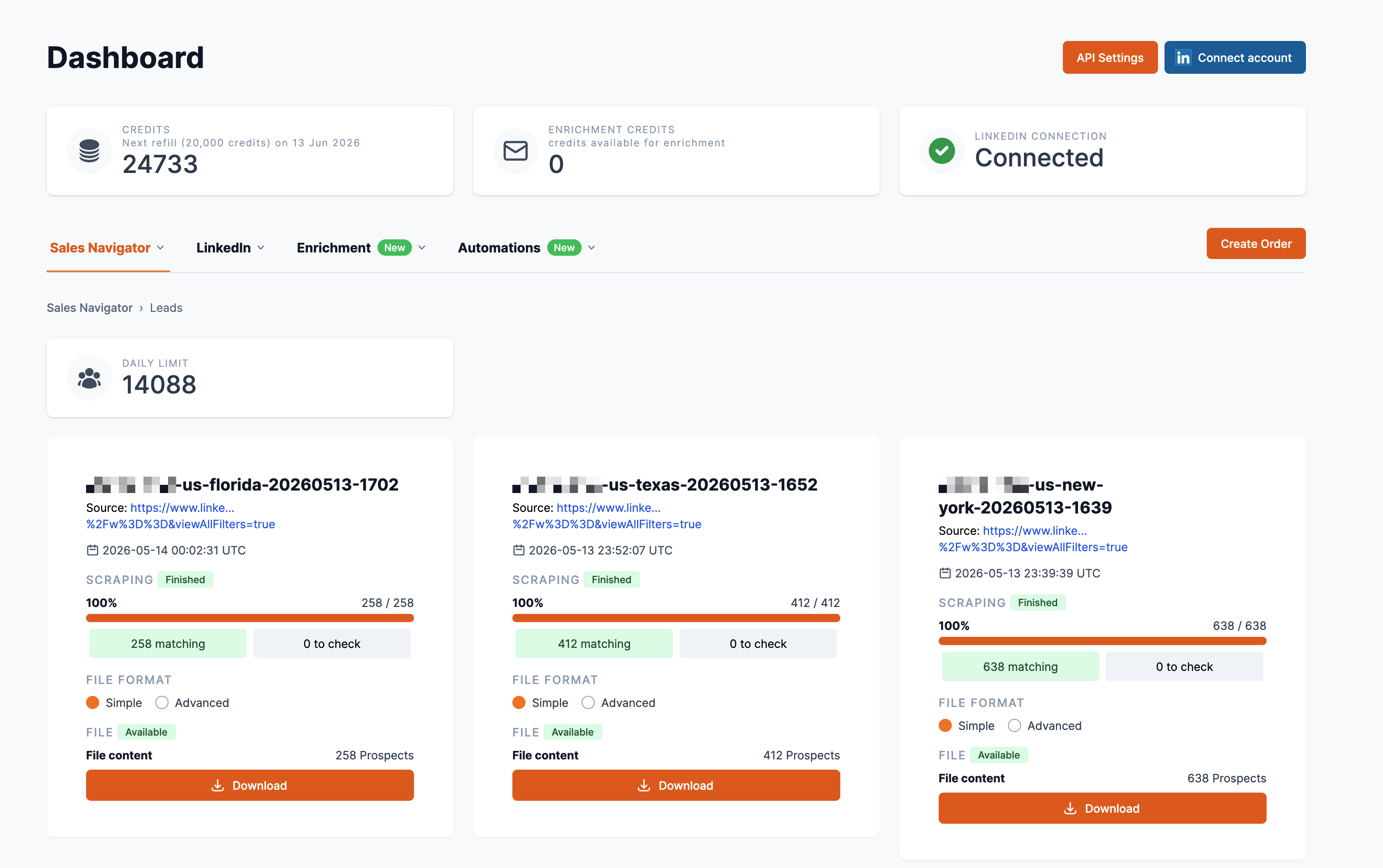
For example, if I want to scrape all the employees of "Company X", I can build a Sales Navigator search for that. But that search will have more than 2500 results, so Vayne will automatically break it into smaller searches (for example by state) and run those separately, while also deduping the overlapping results.
- Missouri
- Illinois
- California
- New York
- Texas
- Florida
- and so on
A few safety layers was that, remember to buy Starter pack or higher in Vayne, I wasted $29 like this, they dont allow API access in lower plans. Also make sure you tell your AI to write resumable scripts, and also to write as you go in memory. I have learned these things the hard way.
You can scrape upto 15000 records a day, beyond that you are risking ban. So if you buy Sales Navigator for the month you can are looking 15K * 30 days = 450K records from a single account.
What Happens After You Have The URLs
Once you have the LinkedIn URLs scraped from Sales Navigator search, life gets much easier.
At that point, you can use profile scraping and enrichment tools for the second phase. Something like Bright Data-style web scrapers can scrape full profiles from a clean URL list, and if Bright Data is offering enrichment inside the same flow, even better. One less vendor, one less dashboard, one less place for credits to mysteriously become confetti.
If your discovery data is clean, enrichment is boring in the best way.
Realistic Starting Cost For 10K Records
If I had to price a serious 10K-record run from zero (although I wasted money on the fake-account/proxy/burner-phone approach) - I would budget for the stack that actually gets you from Sales Navigator search discovery to enriched records.
| Item | Why | Cost |
|---|---|---|
| Sales Navigator Core | Search access and larger result window | $119.99/mo |
| Vayne Starter | Sales Navigator extraction, API access, CSV export, dedupe | $49/mo |
| Bright Data profile scrape | 10K profile URLs x $1.50 per 1K records | $15 |
| Bright Data enrichment add-on | 10K records x $3 per 1K records | $30 |
So the realistic starting number is about $214 before taxes for one serious 10K-record run: $119.99 for Sales Navigator, $49 for Vayne Starter, $15 for the profile scrape, and $30 for Bright Data enrichment. That is way cleaner than adding another $149/mo enrichment subscription if the Bright Data add-on works for your fields.
That assumes one enrichment pass at $3-$8 per 1K (I have seen such numbers been thrown around for enrichment). If you verify every email, retry misses, enrich phone numbers, or run the list through multiple vendors, the number moves.
Also: this does not include your time, failed experiments, cold email domains/inboxes, compliance review, or the emotional damage of watching a fresh LinkedIn account ask for face verification (haha ;D).